
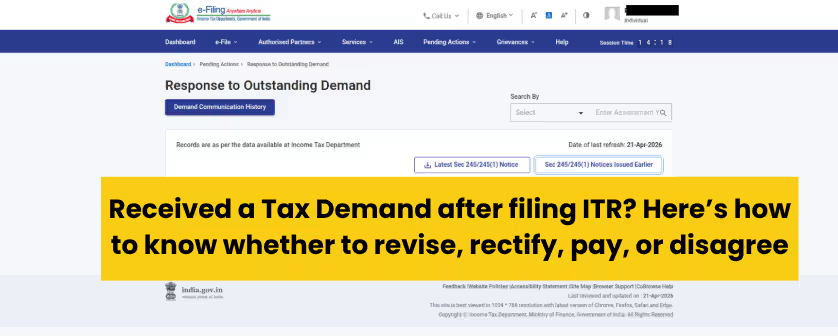
This is an easy decision workflow for a taxpayer to assist them if they have received a tax demand. What to do? What to check? How to decide? You can do all this yourself once you understand how a CA evaluates it. Here’s the correct way to approach this:
Start here: what exactly did you receive?
I filed my ITR and saw the tax payable. Is this a demand or just self-assessment tax?
If the taxpayer is filing the ITR based on their own calculation of taxes but did not pay the taxes then that shall be considered self-assessment tax. However, if the return has been duly filed and taxes have been paid, any such tax payable shown there would be an outstanding demand raised by CPC or tax authorities for previous years.
Did I receive a 143(1) intimation or is this just showing as a demand on the portal?
Intimation under section 143(1) is the outcome of filing your return, if any tax, interest, or penalty is payable by the taxpayer, it shall be intimated, in the form of password-protected PDF in a registered email ID. Taxpayers can also check by logging in to the portal. Path: e-File > Income Tax Return > View Filed Returns to download the intimation.
Where is this demand showing — Outstanding Demand, a notice, or e-Proceedings?
Log in to the portal > check the pending actions. The routine demands are shown under “Respond to outstanding demand”. The demand from a notice or e-proceeding sent by an assessing officer (AO) is shown under e-proceedings.
Why did I get this demand — CPC processing, mismatch, or something else?
The demand under section 143(1) is auto-generated by CPC for calculation errors, tax-credit mismatch or unaccounted income that can alter the tax liability of the taxpayer. The Intimation sent to the taxpayer would clearly reflect how you have calculated the tax and how the system has assessed your tax.
First decision: do you agree with the demand or not?
The amount looks right. Should I pay now?
Yes, if the demand shows the amount that appears logically correct based on the records held by them for tax computation. You can make the payment of your income tax demand through the e-filing portal.
Part of the demand looks correct and part looks wrong. What should I do?
If only a part of it appears correct and the rest is incorrect, You can make partial payment of the amount that appears correct by choosing the option “disagree with demand” (partial) along with stating your reasons.
The demand looks completely wrong. How do I challenge it?
If the whole tax demand appears incorrect. You can select the option “disagree with demand” (Full) along with stating the reasons to challenge it.
What happens if I do nothing?
In case you do not respond, demand may be confirmed. And the system may automatically adjust the outstanding payable against any future owed taxes or refund of the previous years.
Discover More Related Post
Path A: When you should just pay the demand
I agree with the demand. Can I pay it directly?
Yes. If you agree with the demand received under section 143(1), you can simply “pay now” and you will be directed to the e-pay tax portal then select the regular assessment and proceed to pay.
Do I need a DRN to pay the demand?
DRN is Demand Reference Number. It is a unique ID that helps in matching and verifying the payment made against tax demand. It is not necessary but useful for tracking.
When you have a single demand. DRN is optional.
When you pay demand via the outstanding demand page, in that case, DRN is auto-picked by the system
How do I pay outstanding tax on the portal?
In case you agree to pay the outstanding amount. Just click the “Pay Now” under the “Response to outstanding amount” then make the payment and submit the response.
After payment, do I still need to submit a demand response?
Once you have made the payment of outstanding demand, you must submit the response as you are given an opportunity to confirm if the demand is correct and there is no outstanding tax demand against your PAN.
What if my refund gets adjusted instead?
In case you do not submit the response, then the demand will be confirmed and will be adjusted against refund (if any) or show as demand payable (in case, no refund)
Discover More Related Post
Path B: When you should respond “Disagree with demand”
The demand is wrong. Should I use “Disagree with demand”?
Yes, you can “Disagree with the Demand”. If the demand has been generated under section 143(1) by the Central Processing Centre, merely submitting a response as ‘Disagree with demand’ is not sufficient. The taxpayer must also correct the underlying issue by filing a rectification request or a revised return, as applicable.
Can I disagree only for part of the amount?
Yes, you may select the “Disagree with Demand” (either full or part) under response to outstanding demand and must submit the reasons or explanations, as applicable.
What reasons can I choose while disagreeing?
You may state the following reasons if you disagree with demand raised under section 143(1):
- TDS / tax credit not considered
- Tax paid (advance / self-assessment) not considered
- Income wrongly added / mismatch
- Deduction / exemption wrongly disallowed
- Calculation error (tax / interest mismatch)
- Rectification already filed
- Revised return already filed
- Demand already paid
However, the portal shall ask you to state the following reasons to disagree with the outstanding demands:
- Demand already paid
- Demand is incorrect (general disagreement)
- Rectification request already filed
- Revised return already filed
- Demand reduced / cancelled already
- Appeal already filed
- Demand relates to wrong assessment year / PAN
What if my exact reason is not listed on the portal?
In case if the exact reason is not specified on the portal list, you may select the “others” as the reason after you have chosen to Disagree with the Demand. After the selection you may add the details about the reason and amount not payable under the mentioned reason.
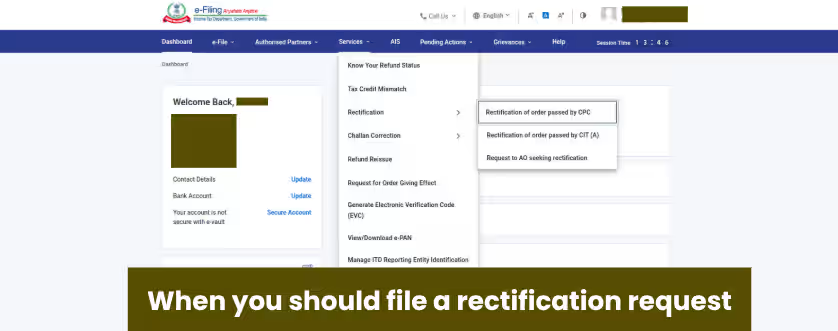
Path C: When you should file a rectification request
I got a demand because CPC processed my return differently. Is rectification the right fix?
Yes, rectification is specifically meant to fix processing errors and it can only be done when your return is processed. You can log in to the portal > Services > Rectification.
I received a 143(1) intimation. Should I revise my return or file rectification?
If you have received demand under section 143(1), that highlights a mistake in system processing the return such as tax credit mismatch, wrong tax calculation, reprocessing of return. You can opt to file rectification.
My TDS/tax credit doesn’t match. Should I file a rectification?
Yes, rectification can be filed for any apparent mismatches made by the system based on the given records.
Discover More Related Post
Path D: When you should file a revised return instead of rectification
I forgot income or entered a wrong figure in my original ITR. Should I revise it?
Yes, revision is meant when any mistake is committed by you while filing ITR. Revision does not mean editing the ITR, rather it completely replaces the original ITR that you have filed.
Can I revise after demand is raised?
Yes, even if your return has already been processed, you can still file a revised return, but only if you discover a mistake made by you in the original return. Log in to the portal → e-File → Income Tax Return → File Income Tax Return, then select ‘Revised Return’.
What if I have not yet received 143(1)?
Yes, this is the right time. If you discover a mistake, revise it early. You don’t have to wait for processing—revision is allowed even before your return is processed.
Until when can a revised return be filed?
You can revise your ITR till 31 December (or sometimes extended to 31 March), but not after assessment is completed
Check Out: Received an Income-Tax Notice under section 268(1) (formally called 142(1))? A First-Response Guide for Salaried ProfessionalsPath E: When demand came through notice / proceedings
This demand came through a notice. Should I still respond from the Outstanding Demand tab?
No. If the demand arises from a scrutiny or reassessment notice under section 143(2) or 148, responding only through the ‘Outstanding Demand’ tab is not sufficient. Such cases require a proper reply to the notice, along with explanation and supporting documents, if you disagree with the demand.
If the issue is in e-Proceedings, where do I need to respond?
You must navigate to Pending Actions > e-Proceedings and submit your reply, documents, and factual arguments directly under that specific notice thread.
When is this not a simple pay-or-rectify case anymore?
If you are under the ‘Scrutiny Assessment’ or ‘Re-assessment’ or ‘Search’, the assessing officer is manually reviewing your case, you should consult a tax professional (CA) to help you draft legal responses
Path F: When portal response is not enough and appeal may be needed
What should I do if I disagree and the issue is still not resolved?
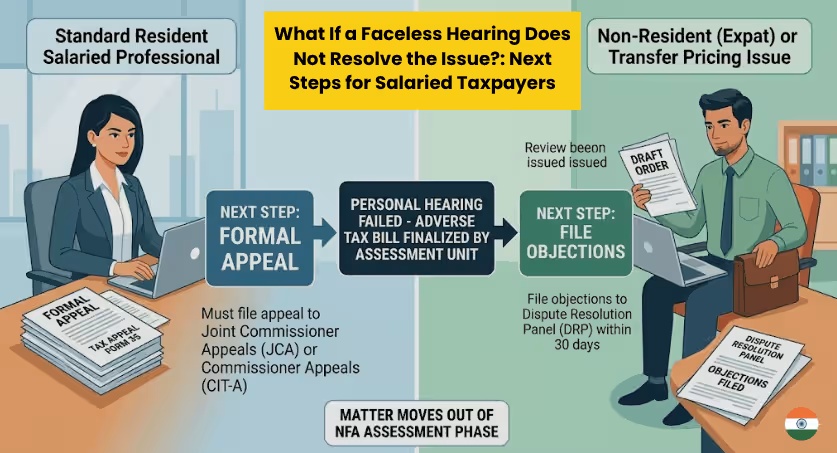
If you are not satisfied with the final order passed by the Assessing Officer (AO), you may appeal against the same order by filing the Form No. 35.
Can I appeal against the order?
Yes, if you are adversely affected by the order passed by the income tax authorities, you can file an appeal before CIT(A). Section 246A of the Income Tax Act lists appealable orders. Some of them are:
- Intimation issued u/s 143(1) making adjustments to the returned income
- Scrutiny Assessment Order u/s 143(3) or an ex-parte assessment Order u/s 144, to object to income determined or loss assessed or tax determined or status under which assessed
- Re-assessment Order passed after reopening the assessment u/s 147/150
- Search Assessment Order u/s 153A or 158BC
- Rectification Order u/s 154/155
- Order u/s 163 treating the taxpayer as agent of a Non-Resident etc
Is Form 35 the next step?
If you are aggrieved by the order of Assessing officer (AO), you may file an appeal for the same before CIT(A) by submitting form 35 on the e-filing portal.
The single most useful section: “Which option fits my case?”
Choose your path
Q1. Do you fully agree with the demand?
- Yes → Go to Pay demand
- Partly → Pay undisputed amount + Disagree for the balance
- No → Go to Disagree with demand
Q2. Is the demand caused by a mismatch in TDS/TCS/challan/tax credit?
- Yes → Check whether 143(1) intimation has been received
- Not received → Revised return
- Received → Rectification
- No → Go to next check
Q3. Is this a processing mistake that can be fixed through rectification?
- Yes → Rectification
- No → Go to next check
Q4. Did the issue arise from a notice/order/proceeding rather than normal processing?
- Yes → Respond through the relevant notice/proceeding path
- Still unresolved after order → Appeal / Form 35
- No → stay within the demand response / revision / rectification flow
Conclusion
It is important to first identify the source of the demand before choosing any action. A demand may arise from an intimation under section 143(1), the ‘Outstanding Demand’ tab, or a notice/e-Proceeding. Each source gives you different response options, such as paying the demand, disagreeing with it, filing a rectification, revising your return, or filing an appeal.
Once you identify the source, you can choose the correct action by following the same decision logic a CA would apply
Outstanding Demand (Start here)
https://www.incometax.gov.in/iec/foportal/help/respond-to-outstanding-demand
https://www.incometax.gov.in/iec/foportal/help/respond-to-outstanding-demand-faq
Rectification (u/s 154)
https://www.incometax.gov.in/iec/foportal/help/how-to-perform-rectification
https://www.incometax.gov.in/iec/foportal/help/perform-rectification-faq
Tax Credit Mismatch (Decides revise vs rectify)
https://www.incometax.gov.in/iec/foportal/help/e-filing-manage-tax-credit-mismatch-faq
Revised Return (u/s 139(5))
https://www.incometax.gov.in/iec/foportal/node/11724
Payment of Demand
https://www.incometax.gov.in/iec/foportal/help/all-topics/e-filing-services/e-pay-tax
https://www.incometax.gov.in/iec/foportal/help/Payment%20of%20Demand%20without%20DRN
Notices / Proceedings (if demand comes via notice)
https://www.incometax.gov.in/iec/foportal/help/respond-to-e-proceedings-faq
Appeal (if disagree beyond portal response)
https://www.incometax.gov.in/iec/foportal/help/statutory-forms/popular-form/form35-faq

Leave a Reply